FAQ · 2025-04-24
How to Use the TC3-401T Front Panel for Temperature and Time Control
This blog walks you through the TC3-401T temperature timer controller’s front panel, explaining each function key, dual display mode, and how to adjust temperature and time settings.
Introduction
The TC3-401T temperature and timer controller is widely used in heat press machines, embossing systems, and logo stamping equipment. One of its standout features is the intuitive front panel, which allows users to quickly adjust both temperature and timing with precision. In this guide, we'll walk you through every element of the panel and how to use it effectively.
1. Understanding the Dual Display
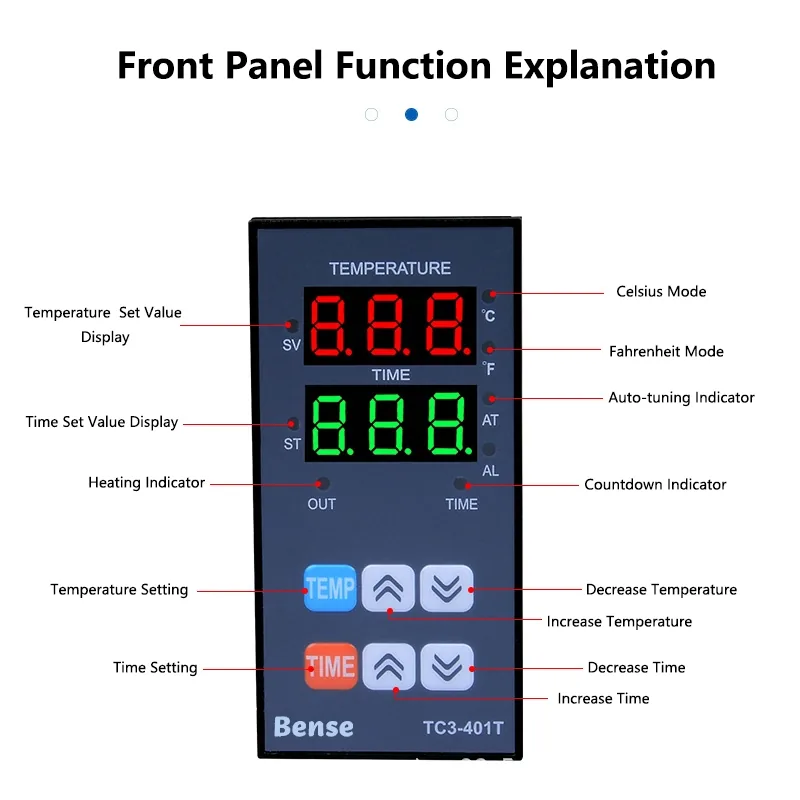
The TC3-401T features two separate LED displays:
- Top Display (SV): Shows the set temperature.
- Bottom Display (ST): Shows the set time in seconds or minutes.
This dual-display system ensures real-time monitoring of both parameters without switching modes.
2. Mode Indicators
- °C / °F: Indicates the selected temperature unit. You can switch between Celsius and Fahrenheit in the settings.
- AT (Auto-tuning): Blinks when the controller is automatically optimizing PID parameters.
- AL: Countdown active indicator.
- OUT: Illuminates when heating output is active.
3. Function Keys Explained
- TEMP: Enter temperature setting mode.
- TIME: Enter timer setting mode.
- ▲ / ▼ Arrows: Used to increase or decrease values.
To set the temperature, press TEMP, then use ▲/▼ to adjust.
To set the timer, press TIME, then adjust with ▲/▼.
4. Real-World Applications
This user-friendly interface makes the TC3-401T perfect for:
- Heat press transfer printing
- Leather logo stamping
- Mask and textile welding equipment
- DIY and professional workshop settings
5. Pro Tips
- Always confirm whether your unit uses internal relay output or external SSR.
- If the heating indicator (OUT) stays on, double-check your sensor connection.
- Use the Auto-Tune (AT) mode for the first-time setup to ensure optimal control accuracy.
Conclusion
The TC3-401T panel layout is designed for ease of use without sacrificing precision. Whether you're working with temperature-sensitive materials or time-critical processes, mastering the front panel ensures better efficiency and control.